What is the Impact of 'Step Count' in Image Generation AI? Verifying the Relationship Between Detail Density and Generation Time
When generating images with AI, there are many settings to choose from, but 'step count' is one of the fundamental ones. In this article, I will share the results of a verification where I changed only the step count under identical conditions to see how the density of the details changes.
- Step count refers to the number of times the AI 'redraws' the image.
- While increasing the step count tends to refine the details, the generation time also increases proportionally.
- Adjusting the count to match your preferred density is the shortcut to achieving the ideal image.
Experiment Overview and Conditions
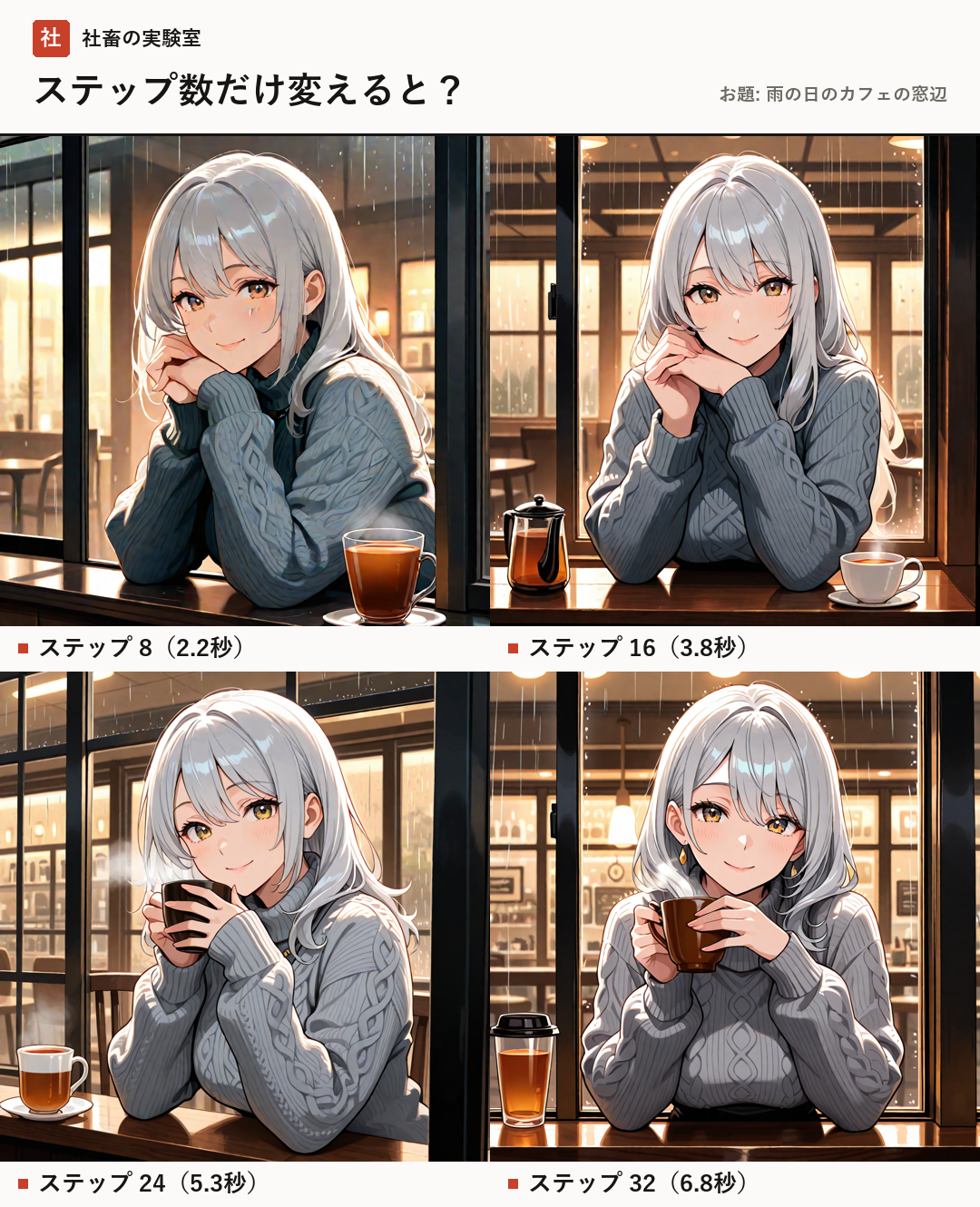
In this verification, I compared results for the same prompt (a cafe window on a rainy day, original character) by changing only the step count. To maintain comparison accuracy, all other settings were kept fixed.
The environment and model information used are as follows:
Model: novaAnimeXL (an anime-style model based on SDXL)
Tool: Stable Diffusion WebUI Forge
Image size: 1024x1024
CFG Scale (the value that adjusts faithfulness to the prompt): 5
Sampler (the calculation method for removing noise): Euler a
Seed (the random seed that serves as the basis for the generation result): 380924
PC used for generation: RTX 4080 (VRAM 16GB)
- Step counts for comparison: 8, 16, 24, 32
Changes in Generation Time Due to Differences in Step Count
Increasing the step count means asking the AI to 'redraw more carefully.' Therefore, the longer the count, the longer the time taken for generation. The generation times for each step measured in this experiment are as follows.
Step 8: 2.2 seconds (instant)
Step 16: 3.8 seconds (comfortable, faster than reading)
Step 24: 5.3 seconds (comfortable, faster than reading)
Step 32: 6.8 seconds (comfortable, faster than reading)
The results of this verification confirmed that even when increasing the step count to the maximum value (32), the generation time remains within a range of a few seconds. In a modern hardware environment, it can be said that adjustments are possible without experiencing significant wait times, even when seeking high levels of detail.
- Step 8: 2.2 seconds
- Step 16: 3.8 seconds
- Step 24: 5.3 seconds
- Step 32: 6.8 seconds
Detail Density and Visual Changes
When checking the comparison images, differences in the final look of the images appear as the step count increases. Generally, at low step counts, the focus is on capturing the overall shape, but increasing the count tends to refine the depiction of details and textures.
For example, while low values like step 8 allow for rapid generation, it is effective to adjust within the range of 16 to 32 when seeking more precise expressions. Conversely, this comparison also shows that even if extremely high values are set, the density of the details does not improve dramatically beyond a certain point.
The important thing is not to demand a high step count uniformly for all images, but to identify 'where your preferred density lies.'
- Low step count: Rapid generation is possible. Suitable for grasping the overall composition.
- High step count: Refines the details and contributes to improved texture.
Summary: Tips for Finding the Optimal Balance
In image generation AI, step count is an important element for balancing 'speed' and 'quality (density).' In this verification, it was possible to generate images instantly even with a low step count, and also increase detail at a comfortable speed even with a high step count.
The tip is to first try standard values and then gradually increase the numbers if you feel the details of the generated image are insufficient. Please find the optimal point that fits your production style and desired quality.
- First, check the base composition with standard values.
- Fine-tune the step count according to your preferred detail density.
- Those who have just started with image generation AI
- Those struggling with appropriate step count settings
- Those who want to know the balance between generation time and quality
- Model
- The type of data the AI was trained on. In this case, a model specializing in anime-style images is used.
- Sampler
- The calculation algorithm used when generating images from noise.
- CFG Scale
- A value that determines how faithfully the AI follows the input prompt (instructions).
- VRAM
- The memory installed on the video card, which affects image generation speed and the image sizes that can be handled.
FAQ
Will the image become infinitely beautiful if I increase the step count indefinitely?
According to official information, there is a tendency for changes in detail to slow down (converge) after a certain number of iterations, so it is recommended to adjust within an appropriate range rather than increasing it infinitely.
What should I do if I feel the generation time is slow?
You can improve generation speed by lowering the step count. In this experiment, it was confirmed that generation is instant at step 8.
In this article, we verified the impact of changes in step count on image density and generation time in Stable Diffusion. Please use this as foundational knowledge for finding the optimal balance.