
[Image AI] Changes with just one CFG Scale! Tips for adjusting instruction 'fidelity'
It was discovered that the atmosphere and color intensity of generated images can change significantly with just a single setting: "how much do you want the AI to follow instructions?" This time, we will focus on the 'CFG Scale,' one of the important parameters in image generation AI, and explain the differences in detail.
- CFG Scale is a numerical value that determines how faithfully the AI follows the input prompt (instruction).
- The value of the CFG Scale changes the 'fidelity to instructions' and 'color intensity' of the image.
- In this experiment, it was confirmed that changing the CFG value does not significantly fluctuate the generation time.
- It is recommended to start with standard values and then fine-tune them according to your preferred intensity.
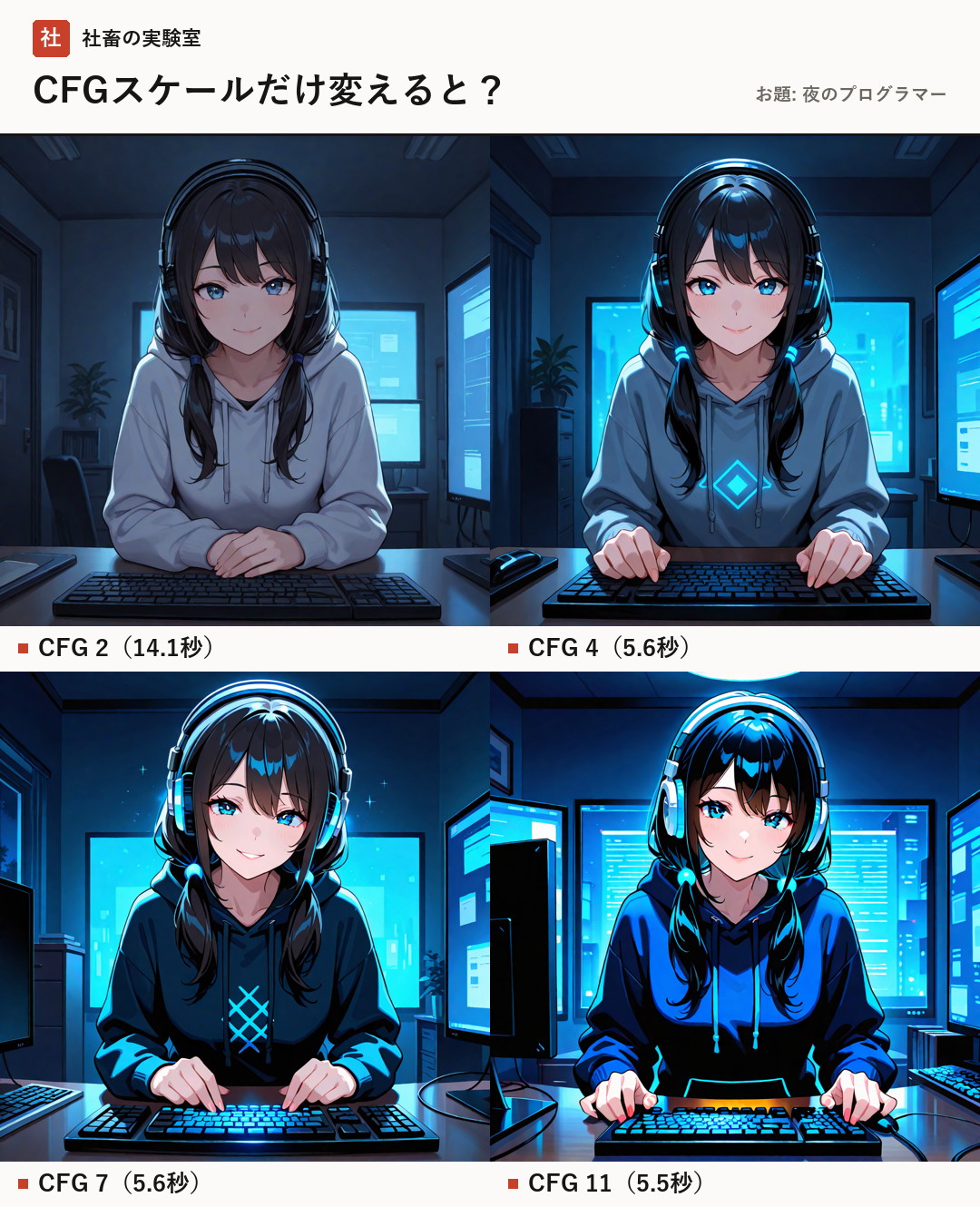
Experiment Overview and Environment
In this experiment, we used the image generation AI model 'novaAnimeXL (an SDXL-based anime-style model)' and compared results by changing only the 'CFG Scale' while keeping the same subject (a programmer at night, an original character).
The tool used is 'Stable Diffusion WebUI Forge'. The image size was fixed at 1024×1024 pixels, and all other conditions—such as steps (number of calculations), sampler (calculation procedure), and seed value (the random number at the base of generation)—were kept identical.
The PC environment used for generation is an RTX 4080 (VRAM 16GB).
- Model: novaAnimeXL
- Tool: Stable Diffusion WebUI Forge
- Image Size: 1024×1024
- Fixed Conditions: Steps 25, Sampler Euler a, Seed 28674
Changes due to CFG Scale differences
In the experiment, we compared the CFG Scale at four levels: "2", "4", "7", and "11". The CFG Scale is a value that controls how strictly the AI reflects the content of the prompt.
Generally, increasing this value makes the AI try to be more faithful to the prompt, but on the other hand, colors and contrast may become over-emphasized, or the depiction may become stiff. Conversely, lowering the value increases the AI's freedom, which can result in softer or more abstract expressions.
Comparing the results of this experiment, clear differences appeared in the atmosphere and color intensity of the artwork depending on the value change. By checking the generated images, you should be able to experience the difference in 'flavor' that each value holds.
- CFG 2: High AI freedom, calm depiction
- CFG 4: Balanced depiction
- CFG 7: Standard fidelity to instructions
- CFG 11: Tends to strongly reflect instructions and have deeper colors
Generation Speed Measurement Results
We also checked how changing the CFG Scale affects generation speed. The experimental results showed that the generation time does not change drastically even when the CFG value is changed.
The specific values are as follows.
While CFG 2 took 14.1 seconds, CFG 4 and above (4, 7, 11) resulted in very high-speed performance of approximately 5.5 to 5.6 seconds. The generation speed for CFG 4 and above is finished at a comfortable speed, almost faster than reading.
- CFG 2: 14.1 seconds
- CFG 4: 5.6 seconds (comfortable, almost faster than reading)
- CFG 7: 5.6 seconds (comfortable, almost faster than reading)
- CFG 11: 5.5 seconds (comfortable, almost faster than reading)
Tips for Mastery
The trick to adjusting the CFG Scale is not to aim for extreme values from the start. First, try starting your generation from around "CFG 7", which is a standard value.
From there, the most efficient method is to fine-tune the value by moving it up or down one step at a time to match your preferred "color intensity" and "degree of following instructions." This accumulation of small adjustments is the key to getting closer to your ideal image.
- Use "CFG 7" as the baseline first
- Change the value one step at a time according to your preference
- Identify the balance between generation speed and depiction
Summary
The CFG Scale is an important handle for controlling the AI's expressive power. Through this experiment, we confirmed that changes in numerical values significantly alter the visual impression. How much do you want the AI to follow your instructions? Please try experimenting to find your preferred intensity in your own environment.
- People who are interested in AI but don't know where to start or if they can run it on their own PC
- People who want to run AI on their own machine without relying on paid services
- People who want to start with AI illustration
- CFG Scale
- A numerical value that determines how faithfully the AI follows the prompt (instruction).
- SDXL-based anime-style model
- A model based on the core model called Stable Diffusion XL, adjusted to specialize in anime-style artwork.
- Sampler
- The calculation procedure used when generating an image from noise.
- Seed
- The value of the random number at the base of generation. By using the same seed value, you can reproduce the same image if the conditions are identical.
FAQ
What happens if I set the CFG Scale too high?
According to official information, if the value is set too high, the image may break down or the colors may become excessively dark. It is important to find a range that suits your preference.
CFG Scale is an important parameter that controls the AI's fidelity to instructions. In this experiment, it was confirmed that high-speed generation of approximately 5.5 seconds (comfortable, almost faster than reading) is possible at CFG 4 and above. It is recommended to start with CFG 7 as a baseline and fine-tune the value according to your preferred intensity.