
How Swapping 'Light' Words in Prompts Can Dramatically Change an Image's Worldview
Did you know that even with the same character and composition, a single specification for 'light' can completely transform the background story? In this article, we explain in detail how words related to 'light' added to prompts affect image generation AI, based on actual experimental results.
- Changes in atmosphere caused by light words (prompts)
- Environment and conditions used in the experiment
- Differences in generation time based on light specifications
- Practical tips for comparing changes
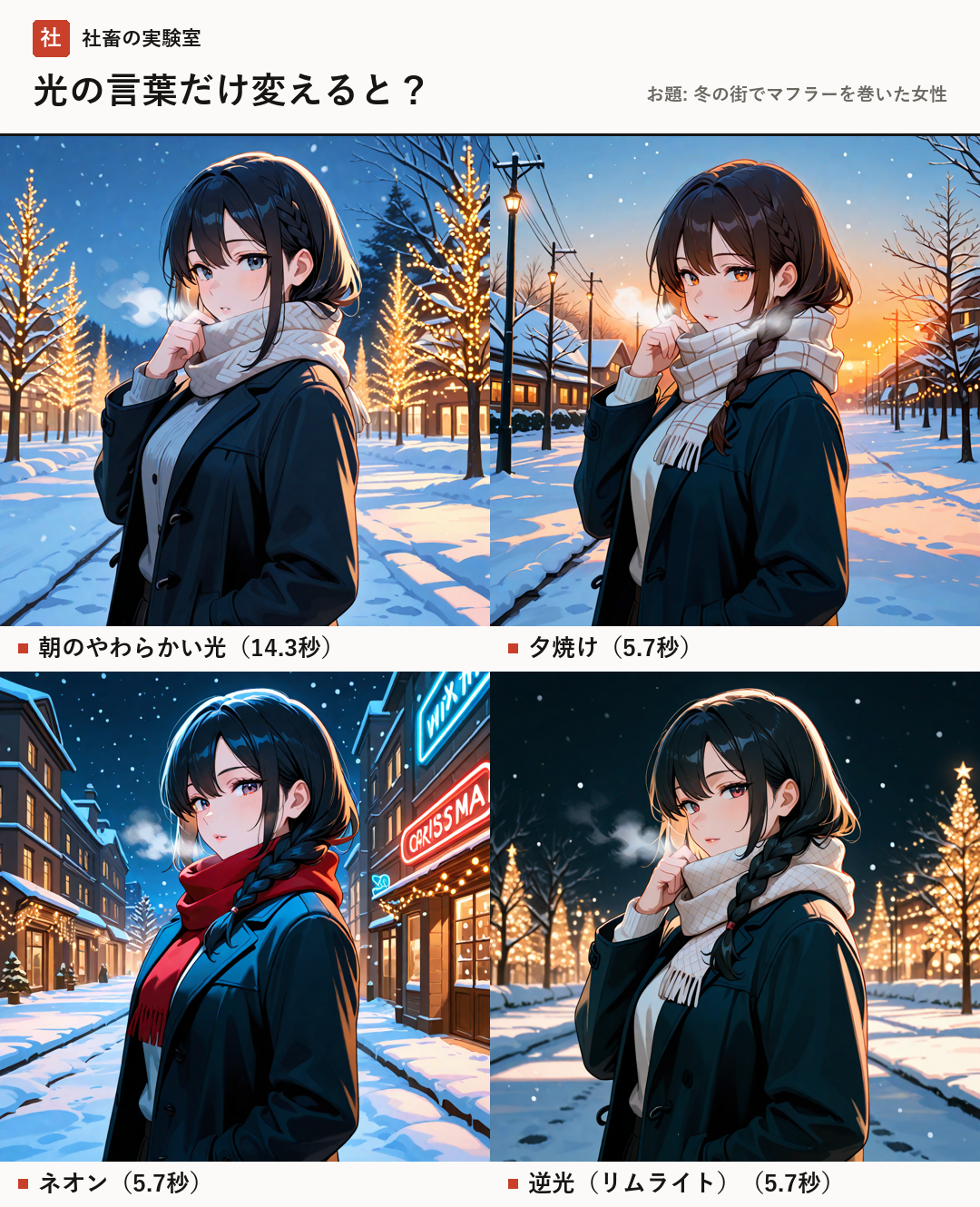
Manipulating 'Atmosphere' with Words of Light
To create a compelling image with image generation AI, it is important not only to consider the character's clothing and pose but also how to express the 'atmosphere' of the scene. One of the major elements that determines this atmosphere is 'light'.
By simply adding words that describe the properties of light to a prompt (instructions for the AI), the AI can specifically differentiate color temperatures and the way shadows fall. For example, even with the same theme of 'a woman wearing a muffler in a winter town,' it is possible to change the scene into a peaceful morning landscape or a stimulating night cityscape depending on the light specification.
In this experiment, we compared the following four different expressions of light:
- soft morning light: Expresses soft, diffused light.
- sunset, orange light: Expresses strong warm-toned light and the resulting shadows.
- neon lights, night: Expresses artificial light of the night city and its reflections.
- rim lighting, dark background: Expresses light that emphasizes the subject's outline (rim lighting: light hitting the subject from behind).
- Morning light: Gives a calm and clean impression.
- Sunset: Creates a dramatic and emotional atmosphere.
- Neon: Emphasizes a cyberpunk or urban night atmosphere.
- Rim lighting: Makes the character's silhouette stand out, giving a mysterious impression.
Experimental Conditions and Measured Data
In this experiment, we compared results by swapping only the prompts related to 'light' while maintaining the same character settings. The environment and conditions used are as follows:
【Used Model】novaAnimeXL (An anime-style model based on the SDXL series)
【Tool】Stable Diffusion WebUI Forge (Software to streamline image generation)
【Image Size】1024×1024
【Common Settings】Steps 25, CFG 5, Sampler Euler a, Seed 110307
【Generation PC】RTX 4080 (VRAM 16GB)
By fixing these conditions, we isolated the changes caused purely by the prompts.
- soft morning light: Generation 14.3 seconds (short wait but usable)
- sunset: Generation 5.7 seconds (instant)
- neon lights: Generation 5.7 seconds (instant)
- rim lighting: Generation 5.7 seconds (instant)
Analysis of Results and Practical Tips
As a result of the experiment, interestingly, there was a slight difference in generation time. Only the 'soft morning light' specification tended to have longer generation times compared to the other three. On the other hand, all other light specifications were able to be rendered instantly.
From these results, it can be said that changing the light instructions does not impose a significant burden on generation time, making it a very efficient method for adjusting the quality and atmosphere of an image.
A point for creating better images is not to try to construct a perfect prompt from the very beginning. It is recommended to first try generating with a standard prompt and then swap 'light' words one by one to compare the changes. This makes it easier to find the atmosphere you prefer.
- First, generate with the basic prompt
- Try adding or changing just one 'light' word
- Compare the changes to find your preferred texture
- Those who want to be particular about the atmosphere of AI illustrations
- Those who want to feel the effects of fine-tuning prompts
- Those running image generation AI on their own PC
- Prompt
- Instructions given to the AI.
- Stable Diffusion WebUI Forge
- One of the tools for operating the image generation AI 'Stable Diffusion' via a web browser.
- Rim lighting
- A lighting technique that illuminates the outline of a subject by shining light from behind it.
FAQ
Does it really change that much just by changing the words for light?
Yes, in this experiment, it was confirmed that even with the same character, a single light specification can express completely different worldviews, such as the tranquility of the morning or the vivid neon of the night.
By adding words that describe the properties of light (such as soft morning light, neon lights, etc.) to the prompt, you can easily manipulate the atmosphere and color temperature of the entire image. It is a very easy-to-handle technique with minimal impact on generation time.