
Verifying the Impact of 'Step Count' in Image Generation AI: The Relationship Between Detail Density and Generation Time
When creating works using image generation AI, 'step count' is one of the settings you will inevitably encounter. Many people likely struggle with what value to set for this. In this article, we verified the changes in images and the progression of generation times by varying only the step count while keeping the same theme and conditions. We explain the differences in a way that is easy for beginners to understand.
- Step count refers to the 'number of times to redraw' as the AI constructs an image from noise.
- Increasing the step count refines the details of the image and changes the density of the rendering.
- While increasing the step count makes the generation time longer, there is a consistent trend in the rate of that increase.
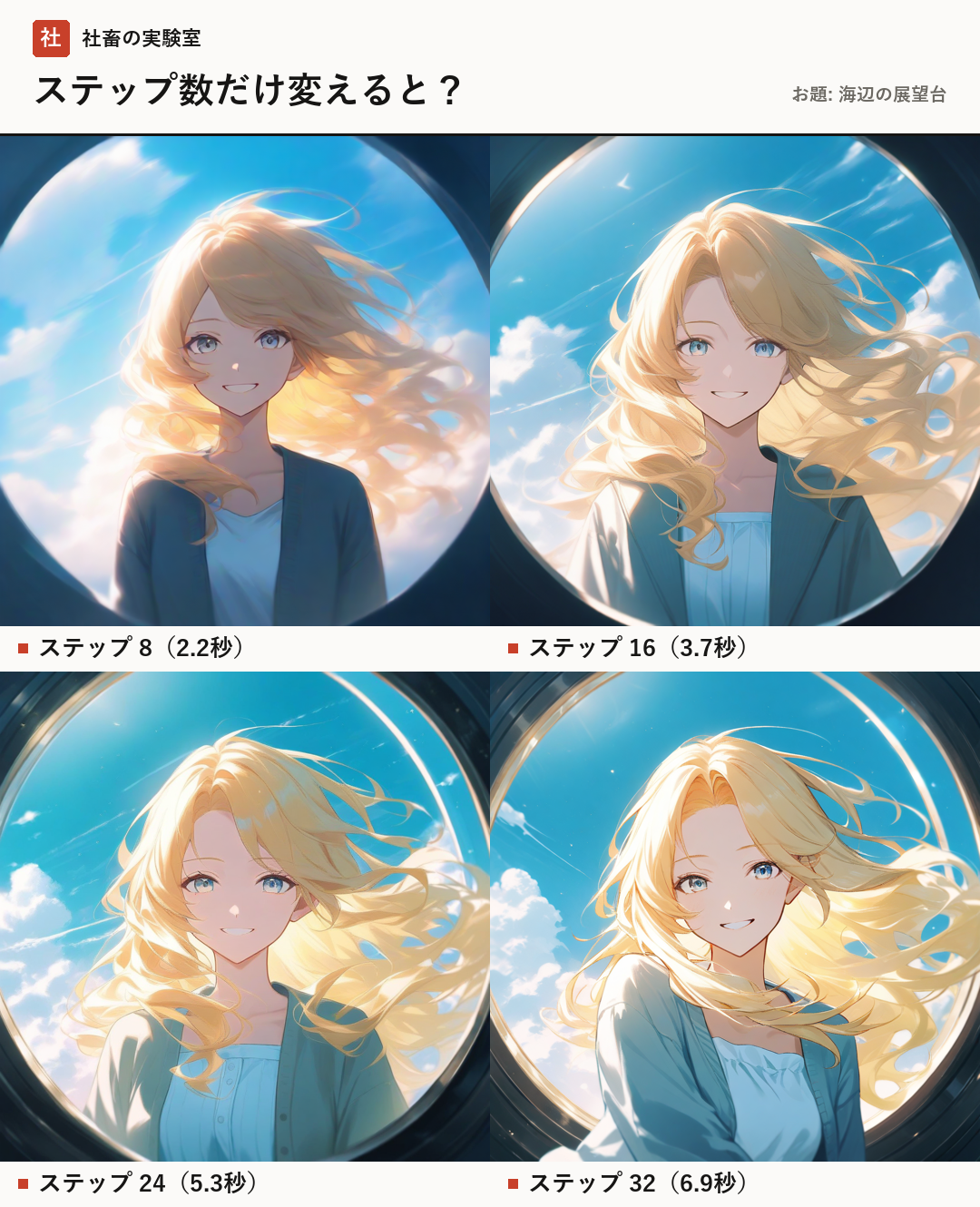
Overview of Verification and Environment
In this verification, we generated images with the themes 'Observation Deck by the Seaside' and 'Original Character' using image generation AI. To increase the accuracy of the comparison, we unified all conditions except for the step count.
The model used is 'novaAnimeXL (an anime-style model based on the SDXL series)'. SDXL (Stable Diffusion XL) refers to a series of image generation AI models that excel at generating high-resolution images.
Additionally, we used 'Stable Diffusion WebUI Forge' as the operation tool. This is one of the interfaces (operating screens) for controlling image generation AI on a web browser. The PC environment used for generation is an RTX 4080 (VRAM 16GB).
- Image Size: 1024×1024
- CFG Scale: 5 (A value to adjust fidelity to the prompt)
- Sampler: Euler a (A type of calculation method to remove noise)
- Seed Value: 604712 (A number to fix the randomness of the generation)
Changes in Generation Time by Step Count
We measured how changing the step count affects the time it takes for an image to be completed. The results are as follows.
Step 8: 2.2 seconds (instant)
Step 16: 3.7 seconds (comfortable, faster than reading)
Step 24: 5.3 seconds (comfortable, faster than reading)
Step 32: 6.9 seconds (comfortable, faster than reading)
The results of the verification confirmed that while generation time increases as the step count increases, in this environment, it remains at a consistently 'comfortable' speed (faster than reading) up to step 32.
- Step 8: 2.2 seconds
- Step 16: 3.7 seconds
- Step 24: 5.3 seconds
- Step 32: 6.9 seconds
Visual Changes and 'Rendering Density'
Next, we will explain the changes in the appearance of the images. Step count refers to the 'number of times to redraw' when the AI builds a picture from pure white noise. As this number changes, the following trends appear in the final output of the image.
When the step count is low (e.g., Step 8), the image is finalized before the AI finishes the rendering, making it possible to generate images that are generally simple and quick. On the other hand, there is a tendency for details to be simplified.
As the step count increases (e.g., Step 24 or 32), the AI spends more iterations correcting the image. This improves the 'density' of the image—such as the texture of the character's hair and the fine rendering of the background—leading to a more refined finish.
However, it is not a case where increasing the step count infinitely is always better. Beyond a certain number of iterations, the visual changes may become gradual, and only the increase in generation time may become noticeable.
- Low step count: Fast generation is possible, but rendering is restrained.
- High step count: Details are refined further, and rendering density increases.
Summary: How to Find the Optimal Step Count
Through this verification, we found that step count is an important item that governs the balance between 'generation speed' and 'rendering density'.
We recommend starting with standard values and then increasing or decreasing the numbers one by one to find the balance between your preferred texture and generation time. In the results of this experiment, it was confirmed that between steps 16 and 32, it is possible to adjust the rendering density while keeping the generation time within a comfortable range.
Please find the optimal step count that suits your personal production style.
- It is recommended to start by trying standard values.
- Change the numbers one by one to check the density you prefer.
- Adjust settings while keeping the balance between speed and quality in mind.
- Beginners who have just started using image generation AI
- Those who want to know the appropriate step count settings
- Those who want to know the benchmark for generation time
- Model
- The type of data the AI has learned. It determines the illustration style and art style.
- CFG Scale
- A value that adjusts how faithfully the AI follows the input words (prompts).
- Sampler
- A calculation algorithm used to generate images by gradually removing noise.
- Seed Value
- A number that serves as the 'seed' for the generated image. Using the same value will reproduce the same image under the same conditions.
FAQ
Does the image quality always improve as the step count increases?
Not necessarily. Beyond a certain step count, changes in rendering become microscopic, and only the generation time may increase. Therefore, it is important to find the point where you find your preferred density.
What is the most recommended step count?
There is no official correct answer, but in this verification, the range of steps 16–32 was confirmed as a range where rendering can be adjusted while maintaining a comfortable generation speed.
By changing the step count, image generation AI changes the 'rendering density'. In this article, we compared steps 8 to 32 using the novaAnimeXL model. We confirmed that while details are refined as the step count increases, the generation time also extends. The shortcut to improvement is to start from standard values and change the numbers one by one to find your preferred balance.