
How Does a Single CFG Scale Change the Image? A Thorough Explanation of Instruction Reflection by Value
When using image generation AI to draw illustrations, it is necessary to adjust various settings in addition to entering prompts (instruction text). Among these, 'CFG Scale' is an important metric that determines how faithfully the AI responds to our instructions. In this article, we will explain how changing this CFG Scale value alters the generated images based on specific experimental results.
- CFG Scale is a value that determines 'fidelity to instructions'
- Color intensity and reaction to instructions change depending on the value
- The tip is to start with standard values and fine-tune them according to your preference
What is CFG Scale?
CFG Scale (Classifier Free Guidance Scale) is, in short, a setting value to determine 'how strongly to make the AI follow the prompt (instruction text).' While image generation AI constructs images based on the words we input, adjusting this scale allows us to control the balance between the AI's 'freedom' and its 'obedience to instructions.'
Increasing the value makes the AI try to reflect the content of the prompt more strongly. On the other hand, decreasing the value causes the AI to interpret instructions loosely and tends to prioritize more free expressions. Understanding this balance is the first step toward extracting the ideal image.
- When increasing the value: It strongly reflects the prompt's instructions, but unnaturalness due to excessive emphasis can occur
- When decreasing the value: The AI's freedom increases and expressions become softer, but instructions may be ignored
Experimental Conditions: Changing only CFG under the same conditions
To verify how the image actually changes when the CFG Scale is altered, we conducted a comparative experiment under the following conditions. To improve comparison accuracy, the prompt, model, image size, and other settings were all fixed to be identical.
【Experimental Conditions】
- Theme: By the cafe window on a rainy day (original character)
- Model used: novaAnimeXL (an anime-style model based on SDXL)
- Tool: Stable Diffusion WebUI Forge
- Image size: 1024×1024
- Number of steps (number of processes to generate the image): 25
- Sampler (calculation method for generating images): Euler a
- Seed (value that serves as the seed for the generation result): 126341
- Generation PC: RTX 4080 (VRAM 16GB)
- CFG Scale values compared: 2 / 4 / 7 / 11
Comparison of Experimental Results and Generation Speed
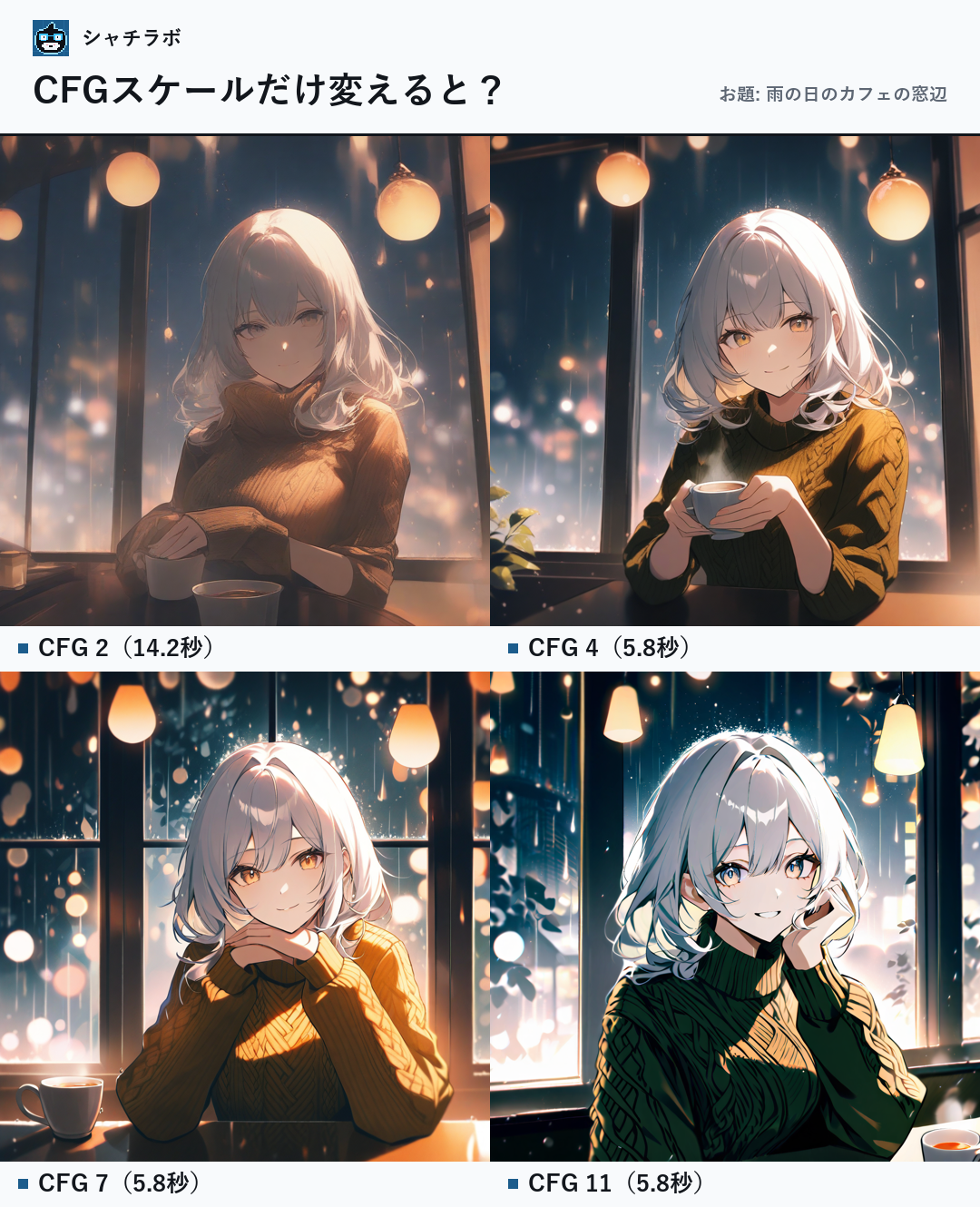
As a result of the experiment, differences were observed not only in the atmosphere of the generated images but also in the time taken for generation by changing the CFG Scale. The generation times for each value are as follows.
- CFG 2: Took about 14.2 seconds to generate (short wait, but usable speed).
- CFG 4: Took about 5.8 seconds to generate (comfortable speed, faster than reading).
- CFG 7: Took about 5.8 seconds to generate (comfortable speed, faster than reading).
- CFG 11: Took about 5.8 seconds to generate (comfortable speed, faster than reading).
From these results, it was confirmed that within the scope of this experiment, generation proceeds very smoothly if the value is 4 or higher. On the other hand, at the extremely low CFG 2, there seems to be a tendency for generation to take a short wait.
- All values except CFG 2 completed generation at a comfortable speed, faster than reading.
Visual Differences Due to CFG Scale Changes
Comparing the generated images, differences in 'color intensity' and 'strength of reaction to instructions' appear depending on the CFG Scale value. Generally, the higher the value, the more the specified elements tend to be emphasized.
For example, when the CFG is low, the AI interprets the prompt softly, making it easier to produce an overall faint atmosphere or expressions mixed with the AI's unique nuances. Conversely, when the CFG is set high, keywords included in the prompt are strongly reflected, and changes such as clearer contrast or specific elements standing out can be seen.
However, if the value is raised too high, colors may become excessively dark or shapes may be unnaturally emphasized, so it is important to find your own 'just right' point.
- CFG 2: High AI freedom, expression that captures instructions loosely
- CFG 4–11: Increased reflection of instructions, degree of emphasis changes as the value rises
Summary: Tips for Adjusting to Get Closer to the Ideal Image
CFG Scale is a very convenient switch to control the 'strength of instructions' in image generation. In this experiment, it was confirmed that the atmosphere of the image changes with just one numerical value.
As advice for beginners, we recommend starting with 'CFG 7,' which is considered a standard value. From there, by observing the changes while moving the value up and down one by one according to your preference, you will be able to smoothly find an expression close to your ideal.
- Start by using CFG 7 as a baseline
- Search for the ideal atmosphere while fine-tuning the value in the preferred direction
- Beginners who have just started with image generation AI
- Those who want to know the role of CFG Scale in detail
- Those who want to adjust the atmosphere of their preferred images
- Prompt
- The 'instruction text' provided to the image generation AI.
- Model
- The part that corresponds to the 'brain' of the image generation AI; an element that determines the art style, such as anime-style or photorealistic.
- Number of steps
- The number of processes repeated by the AI until it completes the image.
- Sampler
- The calculation method used when generating images from noise.
- Seed
- The random value that serves as the source of generation. By using the same seed, you can reproduce the same image if the conditions are the same.
- VRAM
- The video memory installed on the graphics board.
FAQ
Does the image quality become higher as I increase the CFG Scale?
No, it doesn't necessarily become higher quality. CFG Scale determines the 'fidelity to instructions,' and if the value is set too high, colors may become too dark or the image may break.
Is there a relationship between CFG Scale and the number of steps?
There is no direct relationship, but by appropriately combining both values, you can obtain images closer to your ideal.
CFG Scale is a parameter to adjust the 'strength' of instructions to the AI. Since color intensity and reaction to instructions change by changing the value, the shortcut to improvement is to start with a standard value and fine-tune it to your preference.