
Building an AI Coding Environment with Local LLMs | Cline + Ollama with No External Transmission & Measured 88 tokens/sec
I have built an environment where you can have an AI edit files while interacting with it—similar to Claude Code—all running exclusively within your own PC. I prioritized two things: not sending code to external services and preventing AI agents from messing up your PC. I will introduce the configuration, measured speeds, and safety mechanisms in order.
- Configuration of a local AI coding environment built with Cline + Ollama
- Measured speeds and context length selection on an RTX 4080 (VRAM 16GB)
- How to create a safety hook to prevent AI from sending data externally or changing PC settings
Why do AI coding locally?
Cloud-based AI coding is convenient, but the code you write and the contents of your files are sent to external services. When handling work code or personal notes, it is more reassuring to complete everything on your own PC.
When checking my previous settings, I found that the agent's destination was a cloud API. This time, I rebuilt the environment by switching this to a local Ollama and also disabling telemetry (usage data transmission).
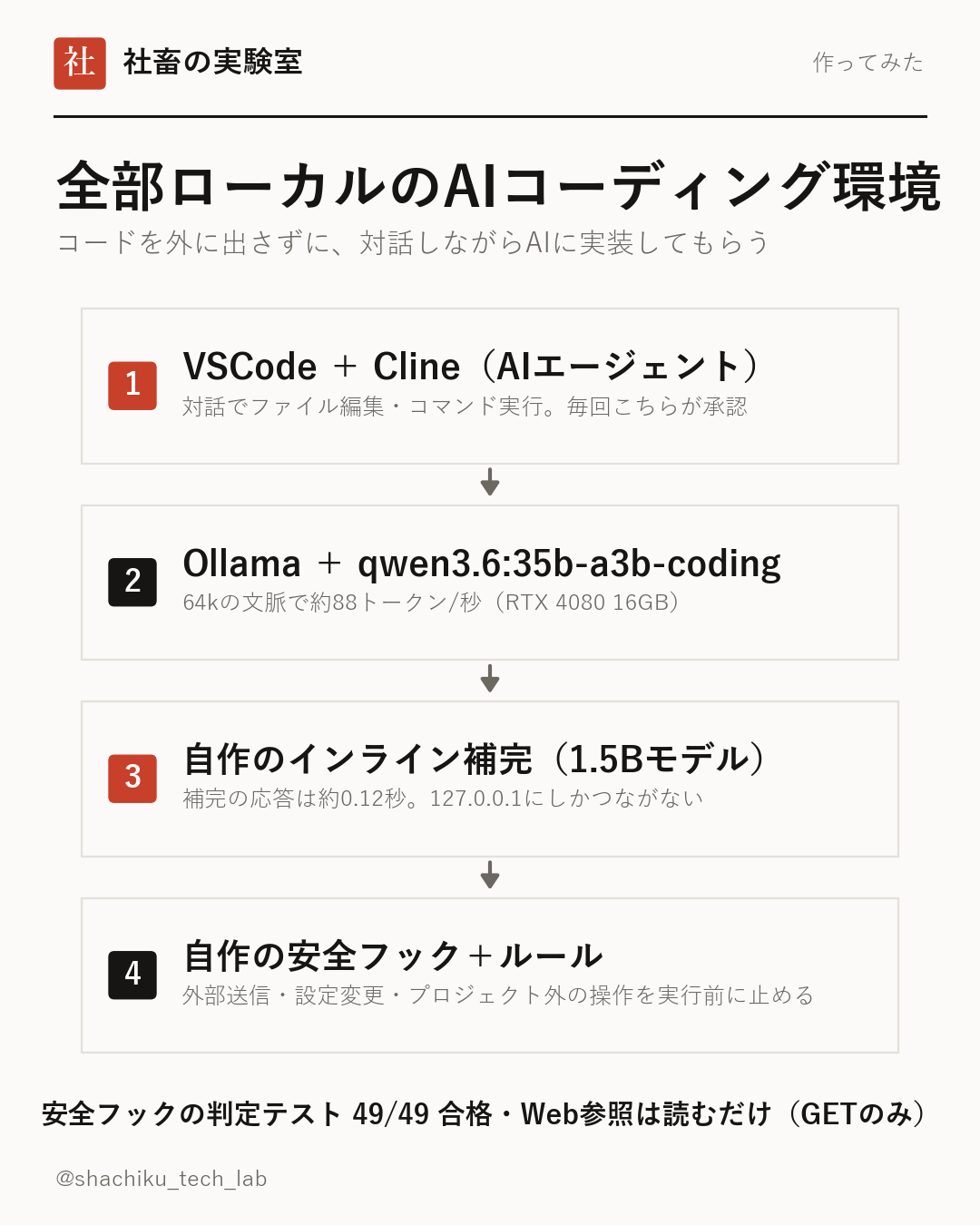
Configuration: Cline + Ollama + qwen3.6:35b-a3b-coding
I used the Cline extension for VSCode as the agent. It allows for file editing and terminal command execution through interaction, and it supports the Model Context Protocol (MCP) for connecting external tools. I excluded Roo Code, a similar extension, because its development ended in May 2026.
Inference is handled by Ollama using the qwen3.6:35b-a3b-coding model. It uses a Mixture of Experts (MoE) architecture; while the total size is 35B, only 3B worth of parameters actually run per calculation, so it runs fast even when split between GPU and memory since it doesn't fit entirely in VRAM. Tool calling was also stable.
The workflow is to consult on plans in Plan mode and have the AI implement them in Act mode. For file editing, command execution, and Web references, an approval button appears every time, while only file reading is permitted automatically.
- Agent: Cline 4.1.23 (VSCode extension)
- Inference: Ollama 0.40.3 (listening only on 127.0.0.1)
- Model: qwen3.6:35b-a3b-coding (22GB)
- Web reference: Custom MCP "web-reader" (read-only)
Measured Performance: Approx. 88 tokens/sec with 64k context
I measured the speeds for different context lengths on my PC (RTX 4080 16GB, Ryzen 7 9800X3D, 32GB RAM). 'Reading' speed is the speed of processing the provided text, and 'generation' speed is the speed at which the AI writes text.
I chose 64k. It uses 15.6GB of VRAM, with the GPU handling 58% of the processing and the CPU handling 42%. While 128k also works, available memory drops to about 7.6GB, so 64k provided a good balance for using other apps simultaneously. Note: The first run immediately after updating Ollama was slow at about 19 tokens/sec, but it returned to normal speed from the second run onwards.
- 32k: Reading approx. 1,200 tokens/sec, Generation approx. 84 tokens/sec
- 64k (Selected): Reading approx. 1,360 tokens/sec, Generation approx. 88 tokens/sec
- 128k: Reading approx. 1,380 tokens/sec, Generation approx. 90 tokens/sec
Settings to keep code from leaving the machine
I identified and blocked every path where data could leave. For when I want to research Web information, I built a small MCP server that only fetches information from the outside. This server only sends GET (read) requests, does not attach cookies or authentication info, and sets limits on URL and search term lengths to make it difficult to exfiltrate data by stuffing it into a URL. It blocks requests to devices inside the home (local IPs) and records all requests.
- Changed the agent's destination from cloud API to local Ollama
- Turned off telemetry for Cline and VSCode
- Turned off automatic command execution, making everything approval-based
- Web reference uses only the custom web-reader (read-only, approval required every time, with logging)
- Prohibited POST, push, and upload in the AI rules
Safety hook to prevent AI agents from messing up the PC
Simply asking via rules isn't enough, as AI might occasionally fail to follow them. Therefore, I established "three promises" and created a safety hook that mechanically stops prohibited operations before execution. The promises are: do not recklessly mess with the Windows environment, do not change settings without permission, and do not use anything outside the project.
Since Cline can call a script with a specific name just before using a tool, I perform the check there and stop the work if a violation occurs. It is designed to stop even if the hook itself fails to run (failing safe). The judgment test passed all 49 cases, and the execution test with the same startup method as Cline passed 11 cases, with each judgment taking about 0.3 seconds.
- Reading/writing files outside the project (including via ../ or user folders)
- Persistent changes to Registry/Environment Variables, Services, Task Scheduler, or Network Settings
- Installing software or packages to the entire PC, adding/removing VSCode extensions
- External access via curl, git push, publishing packages, or POST requests from scripts
Bonus: Custom inline completion
I also built a custom extension that runs entirely locally to provide inline completion, showing the continuation of the input faintly. The connection point is fixed to 127.0.0.1, and there is no telemetry or dependent packages.
The model is qwen2.5-coder:1.5b-base (1.1GB). Because it is small, it can coexist on the same GPU as the main model, and the completion response time was about 0.12 seconds, which did not affect the speed of the main model. It is confirmed with Tab and canceled with Esc.
- People who do not want to send work code to external AIs
- People who want to try using things like Claude Code locally
- People considering safety measures for AI agents
- AI Agent
- An AI that can proceed with file editing and command execution on its own based on instructions.
- MoE
- A model architecture that runs only the necessary parts from many small specialized sections. It runs fast.
- Context
- The length of text the AI can read at once. Longer context uses more memory.
- MCP
- A common mechanism for connecting external tools (such as Web references) to an AI.
- Inline completion
- A feature that suggests the continuation of code at the cursor position while typing.
FAQ
What kind of PC are you running this on?
A PC with an RTX 4080 (VRAM 16GB), Ryzen 7 9800X3D, and 32GB of RAM. It uses 15.6GB of VRAM for a 64k context, with the rest processed by the CPU and memory.
Can I use it similarly to Claude Code's planning mode?
By consulting on plans in Cline's Plan mode and having it implement them in Act mode, you can achieve a similar workflow.
Is it possible to revert the settings?
I have saved the configuration files before changes and recorded how to revert each change. You can return to the original state simply by deleting the extensions and models.
By combining Cline and Ollama, you can create an environment where an AI performs implementations while interacting with you without sending code externally. On an RTX 4080, it reached a practical speed of about 88 tokens/sec with a 64k context. As you expand the scope of what you leave to the AI agent, mechanisms like safety hooks that stop actions before execution become more important.