
[Image AI] How much does a character's impression change with just the 'expression' of a prompt?
Have you ever felt, "I want to draw the ideal expression with AI, but I don't know how to instruct it"? This time, we experimented with how the AI changes the image when only the words related to "expression" are swapped within the same situation. The conclusion is that it is extremely interesting how the narrative of a character can completely change with just a single word.
- The impact of the specificity of words used to instruct expressions (such as smile or pout) on the drawing
- How to accurately grasp the effect of prompts by comparing results while keeping conditions fixed
- Specs of the models and generation environment used for verification
Experiment Overview: The Importance of Comparing with Fixed Conditions
To correctly understand "how the image changes when the prompt is modified" in image generation AI, it is extremely important to keep all other conditions fixed. This time, to prevent unintended changes, we conducted the experiment with the following conditions completely unified.
【Fixed Conditions】 - Model: novaAnimeXL (SDXL-based anime style model) - Tool: Stable Diffusion WebUI Forge - Image Size: 1024×1024 - Steps: 25 - CFG Scale: 5 - Sampler: Euler a - Seed Value: 365017 (*A value to fix the generation result)
By aligning the conditions in this way, we can reliably identify that the factor of change lies "only in the words for expression."
- Model: novaAnimeXL (SDXL-based anime style model)
- Tool: Stable Diffusion WebUI Forge
- Image Size: 1024×1024
- Steps: 25
- CFG Scale: 5
- Sampler: Euler a
- Seed Value: 365017
Verification Results: Changes via 4 Expressions
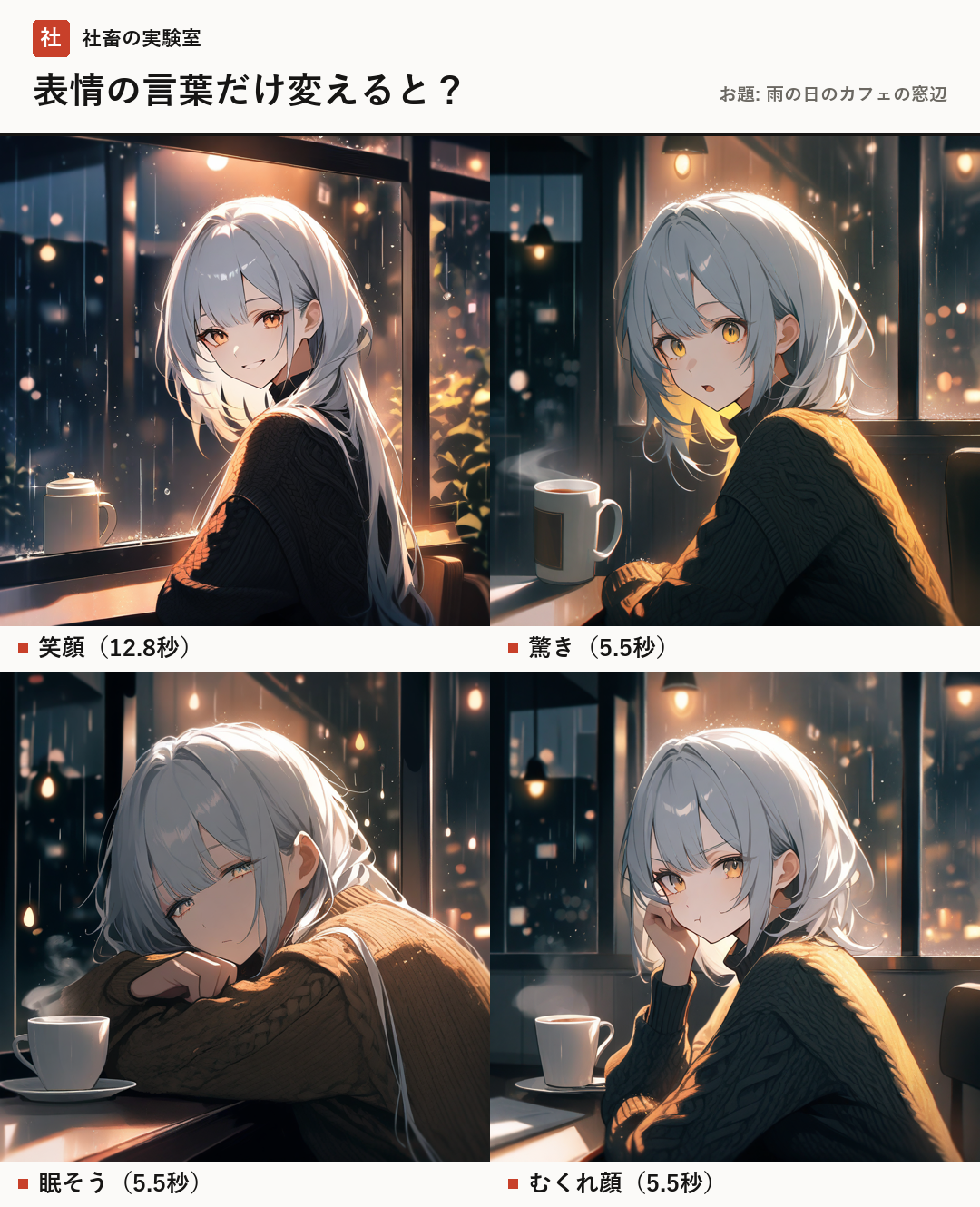
For the theme "By a cafe window on a rainy day," we tested 4 types of expression prompts. The results for each are as follows.
1. Smile (smile) By adding "smile" to the prompt, the character's expression changed to a bright one. The generation time was 12.8 seconds.
2. Surprised (surprised, open mouth) By adding instructions for "surprised" and "open mouth," the eyes and mouth shape were depicted more dynamically. The generation time was 5.5 seconds.
3. Sleepy (sleepy, half-closed eyes) In addition to the state of being "sleepy," by adding the specific description of "half-closed eyes," the expression changed to one where the gaze appeared relaxed. The generation time was 5.5 seconds.
4. Pout (pout) By including the word "pout," a grumpy-looking expression with a pointed mouth was drawn. The generation time was 5.5 seconds.
- Smile: 12.8 seconds (Prompt: smile)
- Surprised: 5.5 seconds (Prompt: surprised, open mouth)
- Sleepy: 5.5 seconds (Prompt: sleepy, half-closed eyes)
- Pout: 5.5 seconds (Prompt: pout)
Generation Speed Trends and Points
In this experiment, slight differences were observed in generation speeds. While generating the smile took 12.8 seconds, the other three expressions were all completed in 5.5 seconds.
A speed of 5.5 seconds feels like a "short wait but usable" level. On the other hand, 12.8 seconds gives the impression of taking slightly more time than that. It is not uncommon for differences of a few seconds to occur depending on the complexity of the prompt and the AI's internal processing.
💡 Point: Tips for reflecting expressions more accurately When asking the AI to draw an expression, it is recommended to combine words that provide specific states, such as "what the eyes look like" or "what the shape of the mouth is," rather than just conveying "emotion." For example, if it is "sleepy," adding "half-closed eyes" makes it easier for the AI to clearly understand the points it needs to differentiate.
- Specificity is important, such as adding "half-closed eyes" to "sleepy"
- Generation time is around 5.5 seconds to 12.8 seconds (short wait to standard waiting time)
- Replacing words one by one while keeping conditions fixed is the shortcut to observing changes
Summary
By changing just a few characters or swapping a single word in the prompt, the character's expression and the impression it gives can change dramatically. First, start with a standard expression, and from there, begin observing how the AI reacts by adding or replacing words one by one.
PC specs used in this experiment: RTX 4080 (VRAM 16GB)
- Start with a standard expression first
- Observe changes by replacing words one by one
- Add specific descriptions (state of eyes and mouth)
- People who want to freely control character expressions in image generation AI
- People who want to know how the image changes with minor prompt adjustments
- People who want to know benchmarks for running AI on their own PC
- SDXL-based anime style model
- An AI model adjusted to specialize in anime-style drawings based on the underlying technology called Stable Diffusion XL.
- Stable Diffusion WebUI Forge
- One of the tools that allows you to operate the image generation AI "Stable Diffusion" from a browser screen.
- CFG Scale
- A value that adjusts how faithfully the AI follows the prompt (instructions).
- Sampler
- Refers to the method used when generating images from noise.
- Seed Value
- A random number value that determines the initial state of the generated image. By using the same seed value, the same image will be generated under the same conditions.
- VRAM
- Refers to the dedicated memory mounted on the graphics board (GPU).
FAQ
Why was the generation time longer only for the smile?
While it is not explicitly stated in official information, differences of a few seconds can occur depending on the content of the prompt and the AI's internal processing.
This time, we verified how the character's impression changes by modifying only the "expression" prompt. By comparing with fixed conditions, you can accurately grasp the influence of the words. Specifically, adding specific descriptions like "half-closed eyes" for "sleepy" is the key point to drawing out an expression closer to your intention.